Press R again to close · This is the actual HTML for this slide
OpenCon Ohio · 2026
Designing Open Learning Tools in a Generative AI Era
Nicole Baker, MSLIS, MSEd · Case Western Reserve University
Fork on GitHub
Before we begin —
Generative AI in your work. One word.
Curious
Cautious
Excited
Overwhelmed
Skeptical
Overload.
Competing priorities. Constant change. No time to start over.
The landscape
Asked to do everything at once.
Adapt to AI...
without overhauling courses or abandoning pedagogical values.
Support critical thinking...
while AI tools reshape how students learn faster than we can evaluate them.
References
Hill, R. (2023). AI as fad or AI as lasting? Priorities for college faculty instructional development for generative artificial intelligence. Irish Journal of Technology Enhanced Learning,7(2), 136-145.
Theelen, H., Canisius, E., & Lambert, G. (2025). The relationship between instructional strategies and cognitive activation in higher education: A student persepctive.Active Learning in Higher Education, 26(3), 521-541.
Zawacki-Richter, O., Marin, V. I., Bond, M., & Gouverneur, F. (2019). Systematic review of research on artificial intelligence applications in higher education - where are the educators? International Journal of Educational Technology in Higher Education, 16(1).
Open.
A tradition of sharing. And a new set of possibilities.
Open educational practice
Sharing is how education improves.
The tradition
The belief that knowledge should be accessible. Platforms like OER Commons and Pressbooks. Creative Commons licensing. The 5Rs: retain, reuse, revise, remix, redistribute.
What's changing
AI extends what one person can create — but without intentional, human-centered evaluation, it produces noise. We need to lead how these tools are used, not just adopt them.
References
Barker, P., & Campbell, L. M. (2016). Open Education.
Mills, A., Bali, M., & Eaton, L. (2023). How do we respond to generative AI in education? Open educational practices give us a framework for an ongoing process.Journal of Applied Learning & Teaching, 6(1).
Orzech, M. J., Zhang, J., Orzel, V., Sultana, S., Thompsell, A., Wood, J., & Ning, Y. (2025). All about OER - Why, what, how, and so what: A colective case study.Journal of Educational Technology Systems, 53(3), 242-259.
UNESCO. (2019). Recommendation on Open Educational Resources (OER).
Wiley, D. (2014, March). The Access Compromise and the 5th R.
Multimedia learning theory
Design principles for your AI prompts.
1ModalityNarration + visuals over text
"Design as a visual walkthrough with narration cues — no walls of text."
click
2CoherenceCut what doesn't matter
"Remove anything that doesn't support the learning objective."
click
3SignalingCues near related content
"Add highlights and color changes when introducing each concept."
click
4SegmentingShort chunks, learner-paced
"Break into discrete steps the learner controls. No step over 2 minutes."
click
5Accessibility & UDLMultiple means of engagement, representation, expression
"Ensure text alternatives, adjustable pacing, and assistive technology support."
click
Click cards to reveal sample prompts
Multimedia Learning Theory
Cavanagh, T. M. & Kiersch, C. E. (2023). Using commonly-available technologies to create online multimedia lessons through the application of Cognitive Theory of Multimedia Learning. Educational Technology Research and Development, 71(3), 1033-1053.
Fyfield, M., Genderson, M., & Phillips, M. (2019). 25 principles for effective instructional video design. Proceedings of Australasian Society for Computers in Learning in Tertiary Education Annual Conference 2019: Diverse Learning. Diverse Goals. One Heart..
Mayer, R. E. (2017). Using multimedia for e-learning. Journal of Computer Assisted Learning, 33(5), 403-423.
Noetel, M., Griffith, S., Delaney, O., Harris, N. R., Sanders, T., Parker, P., ... & Lonsdale, C. (2022). Multimedia design for learning: An overview of reviews with meta-meta-analysis. Review of Educational Research, 92(3), 413-454.
MLT in practice
See the difference.
Library Research & AI: Everything You Need to Know About Using AI in Your Research Process
In this guide, you'll learn about how to use AI tools like ChatGPT, Claude, Gemini, and Copilot during your research process. Research involves many steps: choosing a topic, developing a research question, searching for sources using library databases such as Academic Search Complete, JSTOR, PubMed, Google Scholar, and Web of Science, evaluating those sources for credibility and relevance, reading and annotating sources, synthesizing information, creating an outline, drafting your paper, revising, editing, and properly citing all sources in APA, MLA, or Chicago format depending on your discipline.
✓ Tip: Always evaluate!⚠ Warning: AI can hallucinateℹ Did you know?Important!
Note: Some professors allow AI and some don't, so always check your syllabus and ask your professor before using any AI tools. Also remember that AI tools are constantly changing and new ones come out every week so this guide may not cover all of them. See also our other guides on Citing Sources, Avoiding Plagiarism, Database Searching Tips, Evaluating Sources (CRAAP Test), Research Question Development, and APA 7th Edition Formatting. Related workshops are offered every Tuesday and Thursday — see the library events calendar for details.
Where in the research process are you using AI?
Finding sources
Evaluating sources
Synthesizing ideas
Drafting & revising
What thinking happens at each stage?
Select a stage. Reflect on what you're doing — and what you might hand off. One step at a time.
AI works best alongside established open communities.
Custom fit
Built for your context. Then shared openly.
This presentation: approx.0hours of vibe coding
Use case
Philosophy Class Instruction Request
Students use Generative AI all semester. The assignment: use and evaluate generative AI in an argumentative research essay.
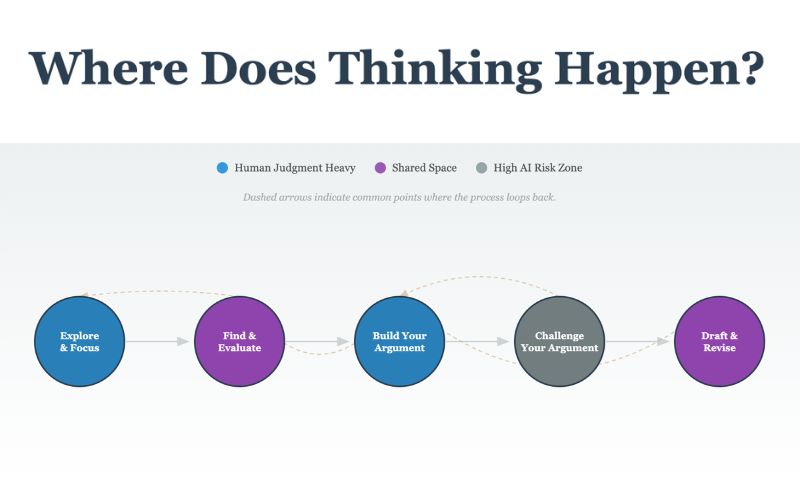
Where does your thinking happen when AI is part of the process?
From prompt to pedagogy
Better prompts, better tools.
"Make me an activity addressing generative AI use in the research process."
+ Learning goals
Students will evaluate AI-generated sources for credibility.
+ Student context
First-year undergraduates with a mix of prior AI experience. Philosophy majors.
+ AI literacy focus
Students identify which cognitive steps they delegated to AI and why.
+ Reflection requirement
Include a metacognitive checkpoint: "What would change if you did this step without AI?"
+ Accessibility & open license
Screen-reader compatible, adjustable pacing. CC BY 4.0 for sharing and remixing.
The thinking map tool
Openly licensed. Interactive. Forkable.
Where Does Thinking Happen?
Prompts reflection on AI use at each stage of the research process. Invites intentionality about what cognitive work might be lost. Adaptable to any context or AI policy.
Faculty need — activities covering content + AI literacy +
Faculty were asking: "How do I bring AI into my class without losing the learning?" They needed something practical, not a policy document.
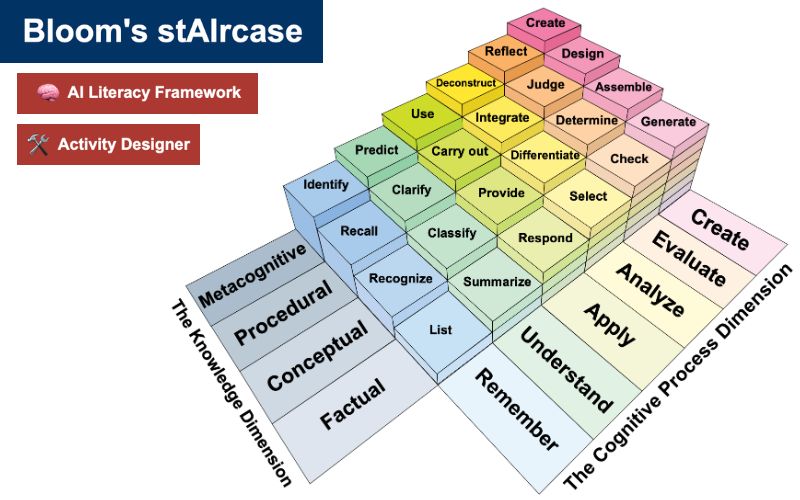
Bloom's StAIrcase — Bloom's, UDL, and digital literacy +
Built an activity bank grounded in pedagogical frameworks. Gave faculty a starting point — not a prescription. This was the project that taught me I could build things.
Iterate — ChatGPT → Claude. Mistakes are part of it +
ChatGPT created errors it couldn't fix. Switching to Claude for coding was a turning point. The iterative process matters — explicitly describing what you want, dedicating time to revision.
Skill building — SVG, GitHub, a whole new world +
Conversations with colleagues opened doors. Learned about version control, open hosting, and how to share work in ways that invite remix. A lot of mistakes along the way.
MLT in prompts — tell AI to segment, signal, and cut +
The AI doesn't know Mayer's principles unless you tell it. Including MLT language in prompts — "chunk into learner-paced steps, add visual cues, remove extraneous content" — changes the output.
Be open to the journey not being perfect.
Your turn
Think about the last time you explained something and wished you had a better tool.
What was the topic? Drop it in the chat.
Why now
Open + AI = broader adoption.
Now possible
Custom tools for your exact students. Shared openly for others to adapt.
Previously wasn't
Required coding expertise or years with the same students. AI changes the equation.
References
Bozkurt, A. (2023). Generative AI, synthetic contents, open educational resources (OER), and open educational practices (OEP): A new front in the openness landscape. Open Praxis, 15(3), 178-184.
Rampelt, F., Ruppert, R., Schleiss, J., Mah, D. K., Bata, K., & Egloffstein, M. (2025). How do AI educators use open educational resources?: A cross-sectoral case study on OER for AI education. Open Praxis, 17(1), 46-63.
Tlili, A., & Burgos, D. (2024). Unleashing the power of Open Educational Practices (OEP) through Artificial Intelligence (AI): Where to begin?. Interactive Learning Environments, 32(10), 6886-6893.
Vibe coding in action
From static OER to interactive tool.
Static OER
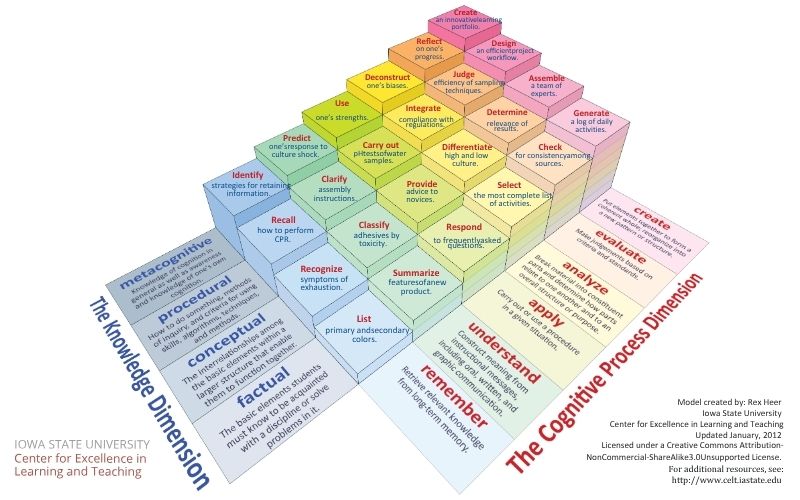
Rex Heer's Model
A well-designed PDF of Bloom's Taxonomy. Widely used. Not interactive. Difficult to adapt.
PDF · Fixed layout · Read-only · Click to preview
→
Interactive tool shared under CC
Bloom's StAIrcase
Interactive, web-based, shared under Creative Commons. Explorable, adaptable, remixable.
HTML · Interactive · CC BY 4.0 · Click to preview
Static OER can become interactive tools shared under CC licenses — vibe coding makes it possible.
Press R on any slide to view its source code.
Interactive features: MLT explorer, before/after demo, prompt layering, expandable talking points, citation drawers, comparison viewer, build timer, and confetti. All vibe-coded.